machine knitting midgauge standard bulky machknit knit machine-knit patterns

Showing posts with label DesignaKnit - DAK. Show all posts

Wednesday, March 10, 2021

Cotton Pullover for Grandson

Finally got over my funk a little bit and did some knitting.  Never contracted the carona virus and did get both of my Pfizer vaccinations.  Dont' know what has been the problem.  Hope to shape up and knit and post some more stuff.  As always the picture doesn't do it justice.  Really does look better in person. Weird dark shadowy rainy day today affecting the photo.  The armhole decreases really are the same.

Just in case you have a 8-9-10 year old to knit for, here is a pattern  you could use. Write to me if you can use the Designaknit file and I'll email it to you.  Otherwise, you can follow the directions below.

Pullover for Luca age 9


Midgauge (SR 860 + ribber)

 by Mar Heck  3-9-21

Notes:

*  Used Conshohocken cotton yarn---has a core that is roving-like with a stronger thread wrapped around.  Shrinks terribly so I knit two gigantic rectangles, guessed that it would be enough yarn to knit the sweater, washed in hot water and dried in dryer.  Then re-wound onto cones.  Should be sufficiently pre-shrunk.  Had to clean a lot of fluff out of the dryer!!! It’s really soft, one positive thing to say about it.

* Sweater is a size 10 as measured by store-bought boys’ sweater.

* Gauge for main pieces is 5 st and 6 rows to one inch at T6

* T 3/3 for ribbing. 

^sleeves 22 rows

^ front and back bottom ribbing 8 rows

^ neck 10 rows

Transferred rib stitches to main bed and knit right to left with one row T 8 for loop through loop bind off.


* DAK shape file is for the pieces not including ribbing.


* Start with waste yarn and ravel cord for all 4 pieces.  When done, turn the piece upside down and do the ribbing.  Bind off for the cotton yarn was nicer than the cast on.  First used a bind off around the gate pegs and it flared too much.  Loop through loop looks better.


*  Neck is big because L wants to wear a cotton T shirt underneath and doesn’t like tight necks.  Can be adjusted.


* Neck was done with FF decreases one side at a time rather than short rowing.  First time doing neck this way and I like it.  Easier to do with this machine than short rowing.  Needles kept popping into work when short rowing, frustrating the heck out of me.  Blue air.  Maybe need a new sponge bar???????


* This yarn is hard to work with since it has NO stretch.  Next time will use an easier-to-work- with yarn.


Now….what to do with all this extra pre-shrunk yarn?????
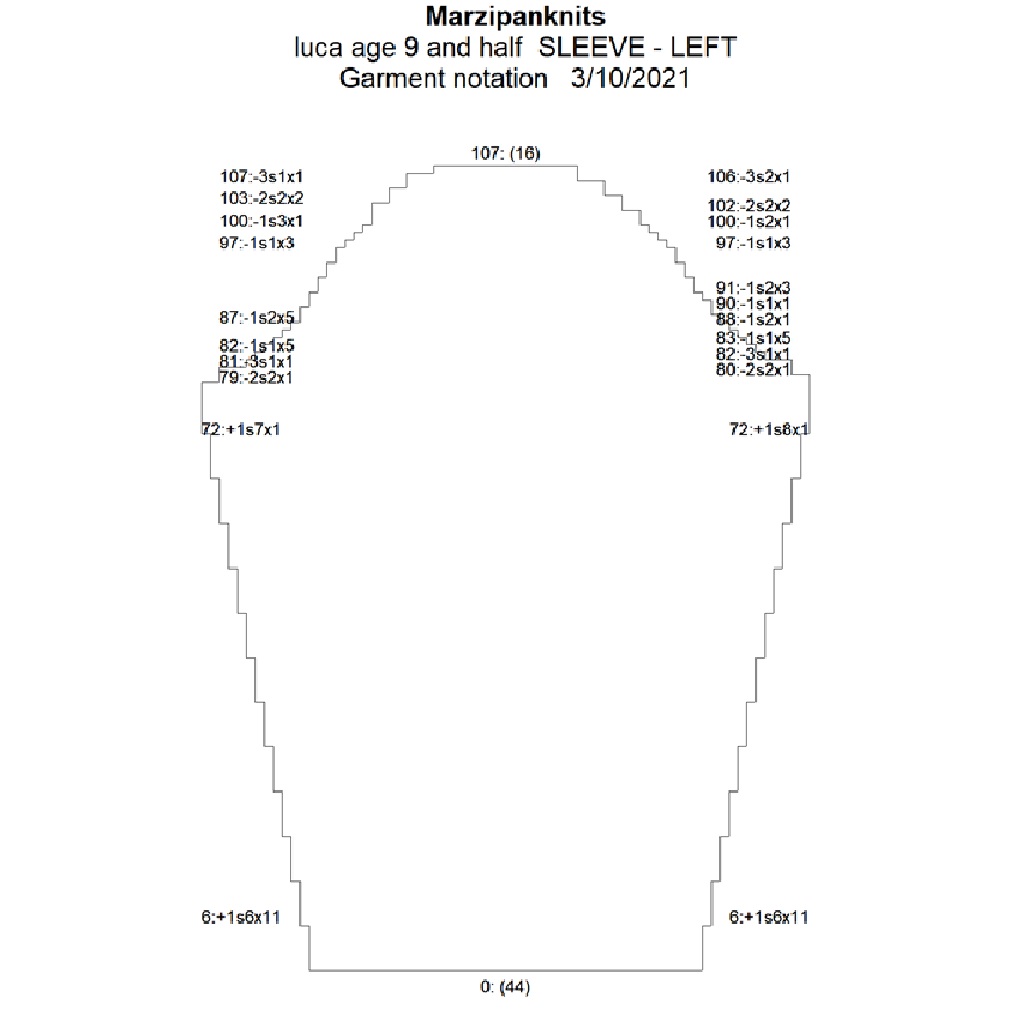


Sorry the numbers are a bit blurry.  I can't seem to copy them so they show up well.

Wednesday, January 22, 2020

Peace from Dale of Norway

A few years ago I downloaded this gorgeous pattern, free from Dale of Norway.
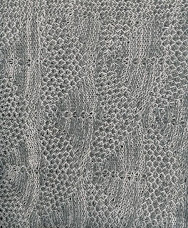
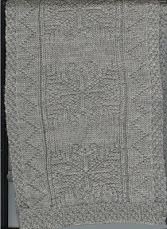
 I haven't yet knit the sweater, but I used the stitch designs to make a warm scarf.  I wore it to a club meeting and one of the gals asked if I would make it for her dad.  He's Norwegian American and proud of his heritage.  So, since I already had the scarf pattern in DAK, it was pretty easy to knit.  I confess I had a mishap about 200 rows in and had to start over.  No problem, really.  I didn't unravel the piece, which I now call my "swatch".  I will try to turn it into a dog sweater for my daughter's little mutt.

Anyway, I am totally in love with this design.  You too can get it here:  https://www.ravelry.com/patterns/library/334-01-peace-jubileumsgenser
You will have to convert it to DAK or I will be willing to email you what I have. (It's a DAK file so you need the program.)

By request, I knit it with acrylic.  Here are some pictures:
This is the back which was originally the design up the sleeves.

This is the front


Because on our knitting machines one can't knit fairisle in the round, the scarf is knit flat then seamed up the back.  Takes some time, but I don't mind watching a movie and hand stitching.  Isn't the pattern yummy?  Took me about 3 hrs to knit (mainly because I had to start over) and 2 hrs to sew up.  Imagine how long it would take to knit by hand!


Sunday, September 15, 2019

Educats and Edudogs

I'm pretty proud.  Mary Ann Oger has used my Educat and Edudog baby blanket patterns a few times for gifts.  I designed it with DAK and used my Brother 970 machine to make them.  The pattern was in a Knitwords issue (can't remember which one).  I suspect her preferred machine is a Silver Reed standard gauge machine.  Somehow translating it to a SR from a Brother created some issues.  Or, it's just the way SR machines work.  I dunno.  She shows how she dealt with it on her blog:  http://knitwords.blogspot.com/    Still  pretty cute patterns, if I do say so myself!


Friday, September 6, 2019

DAK 9 update/upgrade

If you are a DAK user, no doubt you have heard that there is an update available.  Reading the description, I was not so sure about it.  But I admit, I haven't seen all the possibilities.  I'll upgrade anyway. It isn't so expensive, as software goes, to upgrade from 8 to 9. I have this feeling we should support the businesses that are involved with machine knitting or they will disappear.
One nice thing in the upgrade is that the lace module is included.  That should be fun to work with.  I opted not to purchase it last time.
If anyone already has it, I'd love to hear what you think.

Sunday, July 21, 2019

It warms the cockles of my heart

I haven't the faintest idea where that expression comes from and it's 90 degrees F here as I write so I don't need any warming.  But needless to say, I'm pleased.

The picture on the left is my grandson about 4 years ago and the picture on the right is his little friend who has a Peppa Pig themed birthday party coming up next weekend.  He passed along the Peppa Pig sweater I made him and it looks like it is in good shape still.
It probably didn't get worn much since California is not especially conducive to warm sweaters (or the other way around).  I still have the DesignaKnit pattern I worked up for the Peppa design if anyone wants it.  Just write to me.  I used an iron on nylon interfacing for the motif on the back side and it worked wonders to keep all the floats hidden and in line. It was knit on my 970 as a large motif so the patterning would be easy.

You know how many times you give yourself a B+ and wish you had done something differently?  Well, this time it was the drop shoulder.  I should have done a fitted sleeve or a raglan.  Those little 3 year old shoulders are just too small.  O well.  Live and learn.

Our knitting guild is participating in a challenge where we knit 2 hats  for charity per week ending up with 104 hats to donate for the year.  There are 9 people participating and many of us have done lots more than 2 per week so I imagine we'll end up with close to 1,000 hats.  They'll go to the charity of each person's choice.  There is a needy elementary school near where we hold our meetings so that's where mine will go.  So far I have 110 hats but haven't photo'ed them yet.  Last winter when it was so blasted cold I just stayed in and knit my little heart out.  It got kind of addictive and felt good to be getting that yarn stash down a little.  I found I could knit about 9 hats from one cone, so the stash is still there.  I mostly used the yellow hat pattern with the doubled brim, free on the right side of the blog in case you are interested. I did pom poms on all just because I like them.  Some members have made ear flap hats, some have made doubled so that there are 4 layers over the ears when the brim is folded up.  I just made sure the area over the ears was at least doubled.  Otherwise, they are useless in our extreme winter climate.

So that's all until next time. I hope to take a picture of those hats one of these days...


Monday, April 1, 2019

Experiment with artwork

If you remember, I was trying my hand at converting zentangle art to a knitting pattern using DAK.  (See previous post for tips.) I finally managed to produce something.  I seem to enjoy the fooling around with the computer as much as the actual knitting.

Learned a little along the way.  One tip is this:  after you download your (free) zentangle design and open it in Paint, go "save as" and when it gives you the option of different file formats, choose monochrome bitmap.  It doesn't always completely convert it to black and white, but it does save some time in combining all the whites and blacks to 2 single colors. Ignore the "warning". Sometimes it works great. If you are proficient with another image processing program, use that.  The second is the cardinal rule, which I ignored, is to do a swatch.   A little arrogance, you know?? Not so much as to size but in my case whether the colors go together.  I loved the colors each by themselves but am not so crazy about what they look like together.  O well, was an experiment.  Finally, I think the larger design elements show up better than little tiny details.  But this may be just personal preference or this particular design.  Now that it has been knit up, I can see some improvements that could have been made.

So, anyway, here's my experiment.  I didn't want to do a time-consuming long scarf, so I opted for a cowl.
I wanted the cowl to be about 30 inches around and 10 inches high after hemming.  In order to get the 30 inches, it had to be knit lengthwise.  I used my Brother 970 standard gauge. My dimensions at a gauge of 7 st and 10 r at T9 were 140 ( 10 inches doubled)  stitches x 300 rows.  I didn't pay attention to whether any of the design matched anywhere it was to be seamed.  I did knit a few rows of waste yarn then plain rows at the beginning and end to make the kitchener stitching join easier than using the fairisle stitches. I decided I could put the join at the back of my neck so it wouldn't show.

Once off the machine I joined it into a tube with the kitchener stitch, then folded it in half to make it double, thus hiding the many long floats. I seamed with a mattress stitch.  I was careful to not skew the edges.   I didn't find the long floats an issue, but I suppose you could deal with them as you are knitting if they bother you.  They are hidden anyway, and when you block the knitting, the stitches stay put. Maybe if you were using a silky yarn, the stitches would not stay put.   I put the seam in the middle so that it wouldn't be visible, then steamed it aggressively.

Was a fun and fast project.  I think I'll do more.  I have amassed about 30 designs to keep me out of trouble for a good long while.  As always, write to me if you need help converting the design in DAK or any other issue.

April 1st!  Yea, spring is arriving.  We had a terrible winter, so the milder temps are really welcome.

Wednesday, October 17, 2018

By George it fits!

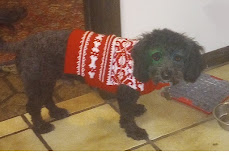
His name is actually Ollie.  Had to show a picture of the swatched dog sweater-  I'm surprised and glad it fits .  Cute, eh?
Below are some pictures of the construction in case you want to make one.


Of course you'll need to do a swatch for the gusset to get it the size you need. Just because I am sometimes lazy, I used a 2 x 1 mock rib. If knitting a dog sweater for a larger dog, the ordinary swatch probably isn't going to be big enough.  If you can, measure the length and width you want and knit your "swatch" / rectangle that size. Then use the gusset size to fit.

Thursday, September 27, 2018

Saddle Shoulder Sweater

Another gal and I are teaching saddle shoulder sweater construction to our guild.  Since I had never knit one with this shape, I thought I better practice.  I used DAK and came up with approximately size 8 for my grandson.  You can barely see where the saddle shoulder is in the picture,  but it's there.   I faithfully did my swatch out of Piropo yarn because I had both the red and white in that brand. And red and white is my favorite color combination for a Norwegian sweater. It turned out kind of scratchy, though, and I thought a little kid wouldn't like that at all.  So I found some Tamm Sport in my stash with both blue and white, so I went with that.  Much softer.

The pattern is Dale of Norway's Nagano design.  My grandson likes dinosaurs, so I thought this was kind of close.  I just used the yoke section of the design, not the trim at the bottom and sleeves in their pattern.

However, I liked my swatch so much that I made a doggie sweater out of it. (Note the insert in the picture.)  It was really simple to do:  did mock ribs for the neck and bottom, then added a gusset for the belly. The armholes for the front legs are just holes that are not seamed to the gusset. You can add ribbing for the sleeves, but I didn't think it was necessary. My grandson's dog is little, so it was possible to make it work.  I think it will be really cute to see them walking down the street with matching "sweaters".

If you have a smallish dog, you too can use a favorite swatch for the top of the sweater.  I found a free dog sweater pattern and made the gusset to match his size in width and length.  I tried to also match the distance from neck to leg openings.  So hopefully this one will fit him ok.  Strangely enough, he likes to be warm and doesn't mind wearing sweaters.

I think autumn is really serious about showing up.  Time to think about warmer clothes.  And more knitting.

Tuesday, September 18, 2018

COTTON CHILD'S HOODIE

  I just finished this cotton hoodie for my grandson's 7th birthday which is in October. I'm lucky enough to be able to fly to CA to help him celebrate.  Can't believe how fast these 7 years have flown by.  I almost wish he would not get any older, but I realize that's a bad wish.
  I've had some cones of Conshohocken cotton on hand for a long time.  It's nice yarn, but I knit a sweater for a nephew out of it  before and it shrank terribly.  So this time, I knit a giant rectangle, abused it as much as possible in the washer and dryer to pre-shrink it.  Because it's a cotton core with some other fiber wrapped around it, not plied, a lot of the cotton came off in the dryer. Was still nice though, soft and fluffy. No problems rewinding it.
  I used DAK to come up with a pattern for the midgauge LK 150.  I don't know about you, but I have a hard time judging what the sizes for kids are in DAK.  Have to find measurements for the typical American kid and try to match it up with DAK.  Nothing really matches but I think I got close to a size 8.  It's a tad big and he's a skinny kid, but he'll grow into it. Did a dropped shoulder in standard garment styling then took it into pattern drafting to make adjustments.  Made a hood, a placket for the front and changed the armhole shaping a la Elizabeth Zimmerman.
  The placket turned out really nice, although the picture doesn't do it justice. 
 
  Some take-aways you might get out of this are as follows.  First, I made the armhole shapings of the front and back larger. Instead of binding off 5 stitches, I bound off 9.  That's the Elizabeth Zimmerman thing as in her Tomten jacket, if you are familiar with that pattern.  This helps reduce the bulk in the underarm and shoulder. This 1 1/2 inches were then added to the sleeve length. 
  For the cord that goes through the front of the hood, I cast on 5 stitches and just knit the length to go around the face and enough to hang down each side.  I used to always knit an I cord, but this goes twice as fast and looks just as nice as an I cord because the edges automatically curl in on themselves.
  My hems are different than I usually do.  I started all pieces with waste yarn and started right in with the main yarn.  To make the hems, I crochet cast on over the number of needles in the piece minus a few stitches.  Then I pushed these stitches back and hung the bottom of the piece into the hooks of the needles, wrong side facing and doubling up as needed.  Using a straight edge (the mean cast on comb) I pushed the hung stitches through the crocheted ones.  You know they are through ok when you hear a little popping noise.  Knit the first half of the hem at garment tension.  Then I tightened the tension one whole number for the second half of the hem minus one row, hung the first hem stitches, hand knit one really loose row and did a loop through loop bind off.  The hem lies wonderfully flat and the crochet cast on makes a nice decorative line on the front of the garment.
  The other thing I did was make  a little vent on each side of the body.  It was easy in that I just stopped hemming when I got to the doubled hem and hand stitched the sides of the vent closed.
  I thought this sweater took longer than usual, but it was because I had a gazillion yarn ends to work in. 
  The pictures don't show details very well because of the design of the yarn, but the design of the yarn also hides any irregularities that might be present.  Irregularities ?  Me? no way.
  You know how lots of times your knitting doesn't come out exactly as you would have liked?  This time, which is actually rare for me, I had no "regrets" and wouldn't have done anything differently. 
  I also knit a saddle shoulder sweater for him as practice for a class another woman and I are teaching to my guild.  I couldn't bear to part with the swatch, so I made a doggie sweater out of it to match.  Once I take some pictures, I'll do another blog post.
Happy knitting!

Thursday, August 16, 2018

Zentangle and DAK

I hadn't heard of the term "zentangle" before and happened upon it by accident.  I thought many of the designs would make terrific scarves.  Maybe other things too, pillows?,but I started with scarves.  Here's how I did it:
1.  Google 'free zentangle' or 'free adult coloring book pages'.  There are so many, it's a little overwhelming.  You'll want black and white images that are not copyrighted.
2.  Pick an image you like and click on it to enlarge it.  Right click on it and choose Save image as.  Give it a name and save as a jpg or bmp.  I like to save to my desktop temporarily so it's easily accessible.
3. Open the Paint program (or other image processing program that you are familiar with).  Open the image.
4.  Paint will tell you how many pixels the image is in both directions.  You can resize the image in Paint or in DAK.  I find that resizing it first then putting into DAK works better.  Resize the image so that the width is compatible with the number of needles on your machine.  Write those numbers down. The original was 211 by 288 pixels.  By removing some of the width and doubling the length I got it to the size I wanted.
5.  Open DAK.  Now there are at least two ways you can convert this image to a knitting pattern.  I'll tell you the easiest way, in my opinion.  You can use either stitch designer or the graphics studio.  I used  stitch designer.  When you open the stitch designer part of the program, choose  File...new.  Specify the number of stitches and rows from #4.  Now go Edit...paste.  Voila, you have a stitch pattern.  You may need to fool around a little in terms of cleanup or deleting stitches and rows. 

The biggest obstacle is that black and white images aren't really black and white.  You typically will get lots of whites and lots of blacks.  Replace all the whites until you have just one shade of white.  Do the same with the blacks and grays.
Left click on the color you want and right click on the one you want to change, then click on the arrow marked in red. This is what I got when I converted the sunflower image.  Took a little time, but not too bad. Make sure you have one main and one contrast color.

I made a folder called Zentangle designs and saved all of the conversions in that folder.

It's fun to vary the colors keeping just two colors in work.  (You may want to do dbj, in which case you could do more than one color in a row.)  I chose to use fairisle, because on a scarf that I'm going to fold over and seam the long side, long floats won't matter.  The floats will be hidden inside the scarf.

Some designs are not rectangular and I wanted to add some length so in addition to doubling the image, I chose to knit several inches on both ends in plain stockinette.  I think it's fun to fool around in the program--- call me geeky, I guess. Some colors I thought were interesting:
If you try this and have some difficulties, write to me and I'll try to help.


Saturday, July 16, 2016

Using DAK to Create a Quilt

I have been looking at the quilts that have offset crosses or pluses and want to make a baby quilt using this pattern.  I'm a little challenged where patterns using geometrics are concerned so thought I'd use DAK to help me out.

I knew I wanted a quilt that was about 36" x 48".  DAK presents each stitch as a rectangle so I pretended they were square.  I don't know if you can change that.  So I needed squares that measure
3 1/2" inches to allow for the 1/4" seams and that determined how many "stitches" I would fill in.
12 squares wide and 15 squares long were what was needed counting the borders.  I left all the default colors in the palette in place so I'd have enough to choose from to make the pluses stand out.  Depending on the pattern being designed, a person could choose just those colors to match the fabric that would be used.

This might sound elementary to you or maybe even stupid (!) but it helped me see where the squares need to be placed to get the off- set pluses.  Here's what I got:
DAK wouldn't let me print out the design as is because it was too many colors for fairisle. But by going Options, knitting method, intarsia and saving it that way, DAK would print.  However, I needed to use the single tool to enlarge the pattern to 200% to make it useful.  This is printable this way.   One nice thing is that DAK numbers the columns.  Another help in placing your plus blocks. After the design is printed, you could number the blocks to match the fabric being used.

The picture shown here was a screen shot of the design in DAK and copied to the Paint program.  Any image processing program could be used.  You can also copy the design to the clipboard right from DAK and paste it.  The nice thing about Paint is that it is simple to use, most all pc's have the program and you can resize the picture as large as you need it.

From this point, a person would figure out the 9 patch blocks and draw them in.  It seems to me that there's no easy way to do this... but then again, maybe it's my little "problem" rearing its head again.  You could do your 9 patches this way:


or include the border patches this way?
just pluses or horizontal strips???
I guess I should go hunting on YouTube and find out the best way to do this.  At least now I know what the crosses are supposed to look like.  Some quilt patterns are just not going to work, though. 
Especially those with half square triangles.  But lots will work.  Maybe it can help you too. 


Tuesday, March 3, 2015

Machine Knit George, Peppa Pig's Brother


 A while back, I blogged about taking a coloring page of Peppa Pig and converting it to a stitch pattern in DesignaKnit. http://marzipanknits.blogspot.com/2014/10/using-dak-placing-single-motif-on-front.html        But, I don't think I showed you the end result.  First I did a pillow:


 Well, actually it's George, Peppa's brother.  I added some fairisle designs to his cheek, jacket and hat to help with floats a little. I also wrapped the edges with strands of the main color to keep it from separating.    I used new cotton dishtowels for the lining.  I find that making the lining after knitting the outside of the pillow makes for a perfect fit. I just placed the knit piece on top of the dishtowel and cut allowing for 1/2" seam.   It's stuffed with polyester material that you get at any fabric store. The lining was sewn on the sewing machine; the outside seamed by hand.

Encouraged by the results, I did a sweater, also for my grandson.

The long floats on the pillow didn't matter, but for the sweater they were bothersome.  So I bought some iron-on nylon stabilizer and affixed it to the back before sewing the sweater together.  The advantage of this nylon stuff is that it stretches with the knit a little  but keeps the floats in place.

You can kind of see on the left side where the interfacing was cut.  It's just a little larger than the fairisle pattern. You can also see where I hung a few of the floats, but it  got tiresome really fast, so I quit and opted for the interfacing.   Yes, dbj would be another way to go, but alas I'm still not doing it.

Closeup of the design.  Cute, eh?  I love how George's nose goes off to the side, kind of like a child's drawing.

And finally, proof that it fits.  Hard to get a picture of a constantly moving target!
If I were to make this again, I'd do a modified drop shoulder.  The regular drop shoulder is too bulky for a little kid.  I knew better, but sometimes the brain isn't engaged.

Sunday, December 7, 2014

Christmas Cowls

Sounds like "Christmas Carols" pronounced by a 2-3 year old!

  I knit these for my niece, who wanted cowls for her skiing parents as a Christmas present.  The man's cowl (black one) is 23" around by 10" high.  The woman's is 21" around by 9" high.  They gave the measurements to her, so I'm hoping they fit ok and don't feel like they are choking.  They're doubled, so even though they're acrylic, they should be warm.  I think these will cover the nose and ears.  Or, could be worn kind of bunched down.

Easy to knit---after I got gauge, I figured out how many stitches and rows I needed to get the measurements they wanted.  Then in DAK I designed filler, snowflakes, the skier and initials.  I started with waste yarn, then the plain stockinette at a click or two tighter than the tension for the fairisle and knit the same number of rows that the fairisle design is.  After the inside of the cowl was completed, I knit the fairisle without removing it from the machine.  The top is just a hung hem and a gate peg bind off, so all floats are hidden.  The seam was planned to go up the back.

 If you have some kind of program to download designs to your machine, it's a quick knit. Or, if not, you could just knit it plain or in tuck or knitweave.   Might make one for myself, probably looser though. 

Monday, December 1, 2014

Machine knitting/ DesignaKnit Experiment

I've been admiring some of the things on Ravelry that were knit with Img2track, a computer aided program that works with some Brother electronic knitting machines.  Many are knit in double bed jacquard, which I haven't mastered yet, but I thought I could try the same thing with Photoshop, DesignaKnit and fairisle.

Here's my result.  The photo inset on the right is what I worked with.

Here are the steps I did in case you want to try it too.

1.  I use Photoshop Elements 10.  Changed a color photo to black and white (must be just two colors for our purposes.)  There are numerous applications out there to manipulate photos.  Some are free.

2.  The program has a feature where you can "dither" the photo.  I tried different settings to get something workable.  "Dither" means the computer program decides if something is black, white or gray.  If gray, it puts both colors in to imitate gray, kind of stipples it. Wikipedia describes it this way---

Dither is an intentionally applied form of noise used to randomize quantization error, preventing large-scale patterns such as color banding in images. Dither is routinely used in processing of both digital audio and digital video data, and is often one of the last analog stages of audio production to compact disc.

A typical use of dither is: given an image in grey-scale, convert it to black and white, such that the density of black dots in the new image approximates the average level of grey in the original image.

  WHEW!!!

3.  I resized the photo's pixels to the size I wanted to make the pillow and the size that was knittable on the machine.  Mine happens to be 190 stitches by 234 rows.  About 27" by 24".  Saved the dithered photo in DAK's graphics studio folder.

4.  In DAK's graphics studio, I converted this dithered photo to a stitch design.  In the conversion, I made sure the stitch pattern would be the same number of pixels (width wise and length wise) as the photo.  DAK duplicated it exactly since there were only two colors and the stitches and rows matched.

5.  In DAK's Stitch Designer, I added a white stitch here and there to help with the lonnnnnnnnnnnnng floats.  I also added his name to the inside brim of his hat.

6.  Downloaded the stitch design to my knitting machine and knit the front.  The back is plain white, the same number of stitches and rows.


There are still tons of long floats on the back side, some of which I tried to hang on a same colored stitch a few rows up as it was being knit, but there were so many, I lost patience.  Instead, after it was off the machine, I gave it a good steam to set the stitches and now, a few days later, they have stayed put.  The one thing that I wasn't too happy about was the teeth.  The finished product looks a little jack-o-lantern-ish. But in order to have teeth and not a straight block of white, there had to be one stitch column between teeth.  I think the rest is a pretty good representation.


7.  I used the knitting to make a template for an inner pillow, stuffed and closed it.  Seamed the knitting on 3 sides, inserted the pillow, then seamed the 4th side.


This child has so many toys that it's hard to think of something unusual that will catch his interest.  I thought this would be nifty on his bed.  The heather blue and white are the colors of his bedroom.  And, after all!  How many people have their mug knit into a pillow???


So, anyway, give it a try.  It's fun, unusual and doesn't take a lot of skill, but makes you look a bit of a genius.

Friday, October 17, 2014

Using DAK placing a single motif on the front of a sweater

I'm designing a sweater for my grandson with his favorite (English) cartoon character on the front.  (Peppa Pig)  It's been a while since I've worked with single motifs, so I had to review the process.  It's not very intuitive, so I'm keeping the steps in a DAK Tips and Techniques file on my computer for next time.

1.  Design your motif and your sweater first.  On your motif, make sure your background color (right mouse button) is the color you'll use on the sweater background. Also, make sure your motif includes only the height and width of the motif and check that it is the right number of stitches and rows to fit comfortably onto the front of the sweater.  Baby and children's sweaters can be small so the right motif is important.  Go Options...tensions to put in your swatch information.

2.  In Stitch Designer, go File...new pattern set-up.  Choose the pattern and choose either back or front.  It's probably just my program, but if I chose front first then the pattern, it would flip to back.  IF I chose the pattern first then the side of the sweater, it stayed where I wanted it. 

3.  On the next screen, Tensions and notes, fill in what you want. 

4.  A blank screen appears with the background color you specified and the number of stitches and rows needed.  Go Edit...Import a single motif.   Choose the motif.

5.  If you click the 4th icon from the right on the top bar, you will get a cut out and it's easier to see what your piece will look like.  Left click, hold and drag the motif to the location you want.  Save.

6.  You can either knit the piece interactively with the motif integrated OR you can print the garment notation pattern out to follow.  Then download the motif to your machine positioning it where you want it.  Set your machine for fairisle.  The machine will take care of the design and you will just need to follow the garment notation chart.

There will be long floats because I just want the outline, so I think I'll purchase some of that iron on stuff that stretches a little to enclose the floats.  Let's hope he doesn't change his mind about who's the best character before I get this knit.  If you're interested in Peppa, you can swipe a picture from this website    http://www.peppapig.com/  There are coloring book pages that convert nicely to DAK stitch patterns.  I think it's ok as long as you don't sell items made with those images but knit them as gifts.  Maybe  I'll do George instead:

Tuesday, June 10, 2014

Using DAK to print graph paper

Perhaps you seasoned DAK users realized this a long time ago, but it just dawned on me.  I wanted to create my own lace patterns to use with my new-ish LK150---hand manipulated lace, of course.  There are some really nice projects on Ravelry in the Mid-gauge Machine Knitters group.  I'm especially inspired by hookmeup's lace.  http://www.ravelry.com/people/HookMeUp   Check out his projects.

Anyway, you can use a free program on the internet for creating knitter's graph paper, or use an Excel spreadsheet too.  This is just another easy way.

I tried using a basic graph and typing in the symbols typically used in hand knitting lace patterns.  Probably due to my ignorance, I couldn't get the symbols to print dark enough.  So I decided plain graph paper would work fine and I would draw in my own symbols by hand.  

Here's how to get some nice graph paper;
1.  Open Stitch Designer.  

2.  Accept the 40 st x 40 row default or add/subtract stitches and rows to suit your purpose.

3.  Use the paint bucket to dump white into the work space.

4.  Under Options, change your tension to 4 stitches and 5 rows to the inch so that the grid is large.  You may be able to control the size of the grid by just adjusting in the print options (#6 below) regardless of the tension your file is set at.  Haven't tried it.

5.  File...print.  Save as graphpaper  in a place you can find it again.  I have a misc file for that purpose.

6.  You have some options--- before actually printing--- under Available Formats.  Choose stitch pattern picture,  under page setup choose portrait for vertical lace and landscape for horizontal repeats.  Choose 100% or larger.  You can choose which way the rows and stitches are numbered.  I asked for darker color demarcation, but it didn't seem to make a difference when I printed it out different ways.

7.  DAK may use several pages to print out what you have specified.  I chose the one that made the most sense for the design I planned to do and printed out only that page. (The one starting in the lower right corner for stitches and rows made the most sense to me.) Fianally, click Print.  If you don't get exactly what you want, fiddle around with the settings.

Hope this helps someone.  I'm going to a knit-in in Princeton on Saturday and wanted a chart for a project I want to try.  If it turns out, I'll report.


Sunday, December 22, 2013

Personalized scarf - Machine knit

It's hard to find gifts for men--I think---so I decided to knit my nephew a scarf with some things pertaining to him on it.  I'm lazy so the pictures are from my scanner, which is easier to get to than my camera and download cord.

 It's fun to design things like this in DesignaKnit.  It took a couple of hours to decide what the design should be but also only 2 hours to knit it start to finish.  It's 9" wide and 7 feet long, doubled.  He doesn't like wool, so it's plain ol' Mary Lou's Symphony (acrylic) yarn.The front side has the St. Olaf lion, the college he graduated from,  and the words "um ya ya", which is one of the college songs.  The other side of the front is our family cabin called "Biorn Bakken" with a fish on it because he is an avid fisherman.
The back has his initials, the words Norske, his high school, a skier and the word "uffda"
 Maybe you'd have to be Norwegian-American to get most of this, but he will.  
This is what the center of the scarf looks like, both sides.  Was relieved when the seaming came out ok!  This is maybe an idea for you if you have DesignaKnit and can whip one out in short order.

Monday, January 9, 2012

Back to regular programming

Had a wonderful Christmas vacation. Santa Cruz is beautiful, especially the ocean and coastline. They had unseasonably warm weather plus sunshine, so that was a bonus. My little Santa became exhausted after completing all his rounds. Thought you might like to see that hat on a real baby. (See previous post if you'd like the pattern.)

I think I'll make it an annual affair---knitting a Santa hat for him. He's 3 months old now.

We are having very unusual weather in Minnesota too. Today is supposed to reach 47 degrees F. Normally this time of year we are 20 degrees BELOW zero. A recent poll on a local tv station indicated that 75% of Minnesotans loved this warmth and 25% hated it. Probably the 25% are avid skiers and snowmobilers and we have no snow other than the stuff the ski resorts are making.

Yesterday I installed DAK 8 on a new laptop. I left DAK 7 on my old desktop with Windows XP and am hoping it doesn't die any time soon. This new version looks easy to use. I like the thumbnails---easier to search. Some things are exactly the same, so I don't think it will be difficult to learn. I'm supposed to teach some classes on DAK 8 at the Purls of Joy seminar in April, SO, I better get crackin'.

On the knitting front, I'm working on some prayer shawls to donate. Will post photos soon, I hope.

Also hoping you have a wonderful new year!

Thursday, May 26, 2011

Cutest so far


Here's the latest project. It's supposed to look like a baseball jersey. The father is crazy about baseball, so I thought he might like this. I looked at some of the store-bought outfits I've purchased to get the proportions and drew up a pattern in DAK. I also checked out Glenda Overman's Baby Gift Catalog to get an idea of how she shaped the panties. I used two strands of some mystery cotton yarns a friend gave me. The white has a little bit of slubbiness and the blue is smooth.
Here are my notes about the dimensions prewash:

I think it went from about a size 6 months to 3 months--- But the baby sizes are so arbitrary and dependent on the baby as to when the outfit will be wearable. At least now it's all preshrunk and they can throw the stuff in the washer and dryer.
Here are some closeups:


I have no idea about the wasteband as to whether it will fit. DAK says a baby's waist measurement is 17" for this size, so that's what I went with. Diapers will take up some room, for sure.
Fun when something turns out exactly like you wanted it. That doesn't always happen!